Menu Close
Overview
Menu Close
DISCOVERY

Project The Kraken

Overview

role

Product Designer | UX/UI | Information Architecture | Interaction Design

FOCUS

I translated complex scientific workflows into a configurable workspace where users can build, inspect, run, and compare processes through adjustable grids, flexible panels, connected nodes, and side-by-side scripting.

context

A flexible workspace for complex scientific workflows.

Kraken brings computational tools, scripts, services, data, and connected processes into one visual environment. It supports both structured node-based workflows and direct work with scripts, servers, and individual services.

Challenge

Create one coherent workspace for multiple technical workflows: node-based processes, scripts, servers, and services, all without forcing users into a single interaction model or losing visibility as complexity increases.
The Kraken logo

Users

Wildfire scientists and scientific modelers.

Kraken was designed primarily for wildfire scientists who needed to combine external databases, modeling tools, scripts, and computational services within one controlled in-house workflow. The goal was to reduce fragmentation while preserving the flexibility and technical depth required for scientific work.

Wildfire Scientists & Modelers

Integrate data, models, and computational workflows

Fire Analysts

Build and run modeling workflows

Researchers & Model Developers

Create, test, and validate models

Technical / Data Specialists

Users working with scripts, databases, APIs, servers, and computational resources

RESEARCH

Kraken originated from scientists and modelers who needed a centralized workspace for combining scripts, datasets, servers, models, and automated processes that had traditionally lived across separate systems.
Their requirements shaped the product from the beginning: visual workflow creation, editable code, custom nodes, file and database access, server monitoring, execution controls, error visibility, and workflow-specific QA/QC.

The design challenge was not to simplify scientific capability, but to bring complex tools into one environment without taking control away from expert users.

Insights: Real Users' needs

The scientists’ wish list shaped the product.
Kraken was ideated by the scientists who would use it. Their existing workflows were fragmented across multiple platforms, scripts, data sources, and computational tools. The requirements below came directly from the people doing the work and became the foundation for the product architecture and interaction design.

1

ONE CENTRALIZED WORKSPACE

Run models, scripts, datasets, and microservices from one environment instead of moving between disconnected tools.
2

VISUAL WORKFLOW BUILDING

Create, view, and modify scientific workflows through a drag-and-drop node interface.
3

DIRECT ACCESS TO CODE & DATA

Edit scripts, code, file directories, database structures, and model inputs without leaving the workspace.
4

FLEXIBLE & EXTENSIBLE TOOLS

Adapt available nodes to the project objective, add custom nodes, and extend workflows as science and data evolve.
5

PROCESS VISIBILITY & CONTROL

Run individual nodes or complete workflows, see errors, monitor processing status, stop processes, and understand compute progress.
6

BUILT-IN QA/QC & MONITORING

Inspect outputs and server status, control start/stop points by node, and configure QA/QC automation for the needs of each scientific workflow.
The Kraken, one workspace for many scientific processes

Architecture

Designing one workspace for many scientific processes.

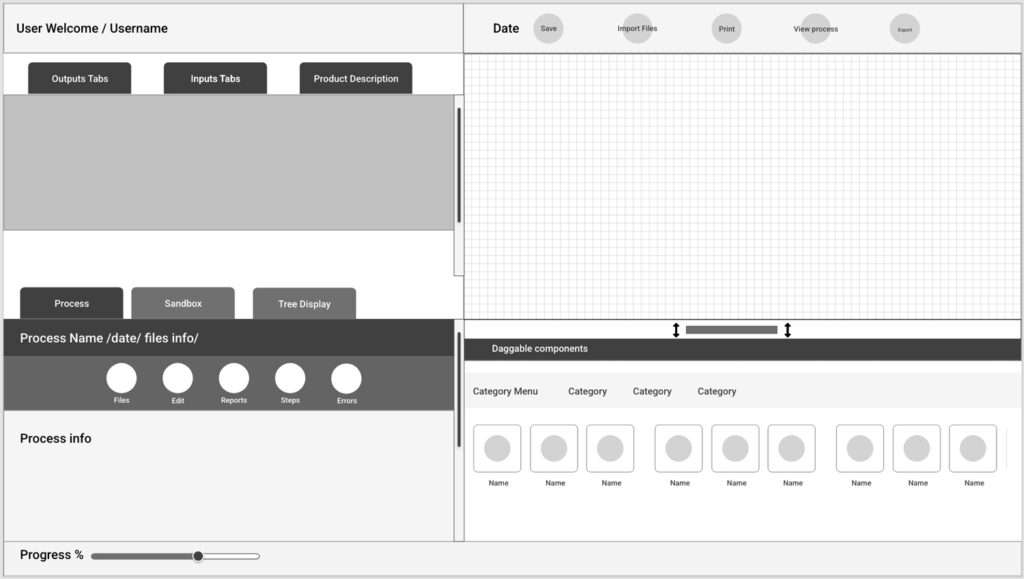
Early architecture focused on organizing the platform around the scientists’ actual workflow rather than around separate tools. I mapped a persistent workspace where users could build processes visually, access files and code, configure inputs and outputs, monitor execution, and inspect results without leaving the environment.
The interface was divided into flexible working zones that could expand, collapse, or resize according to the task, allowing the same system to support visual modeling, scripting, file management, server interaction, and process monitoring.

WORKFLOW CANVAS

Build and connect modeling processes visually.

FLEXIBLE WORKSPACE

Resizable regions adapt to code, files, process details, or visual workflows.

PERSISTENT SYSTEM VISIBILITY

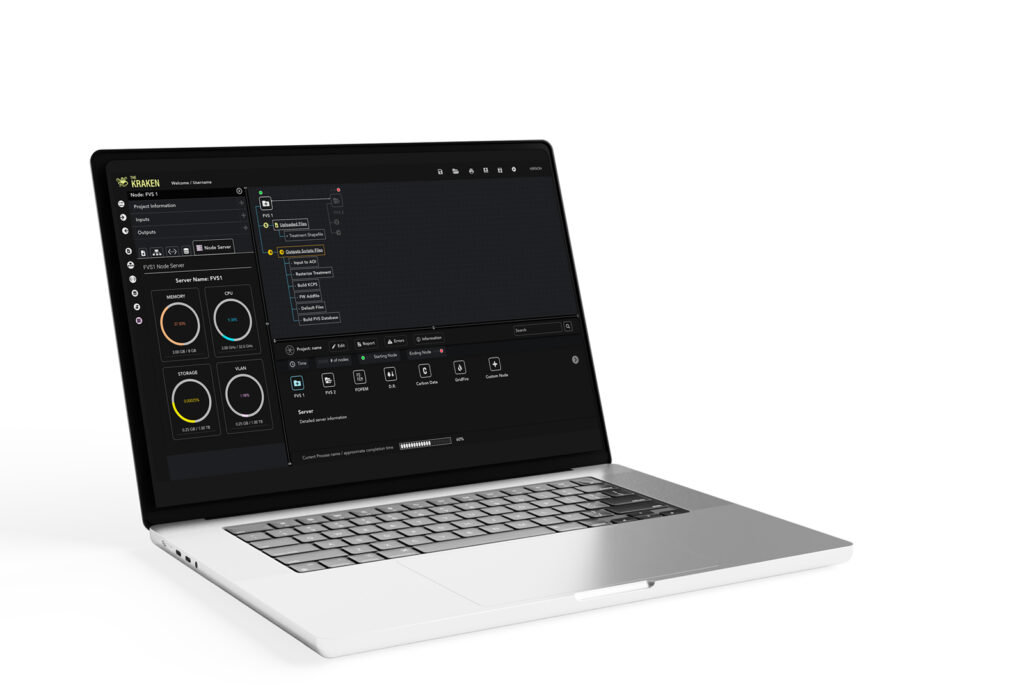
Inputs, outputs, status, errors, tools, and process information remain accessible throughout the workflow.
Kraken Modular scientific sandbox prototype

Design System

Turning complex workflows into reusable interface patterns

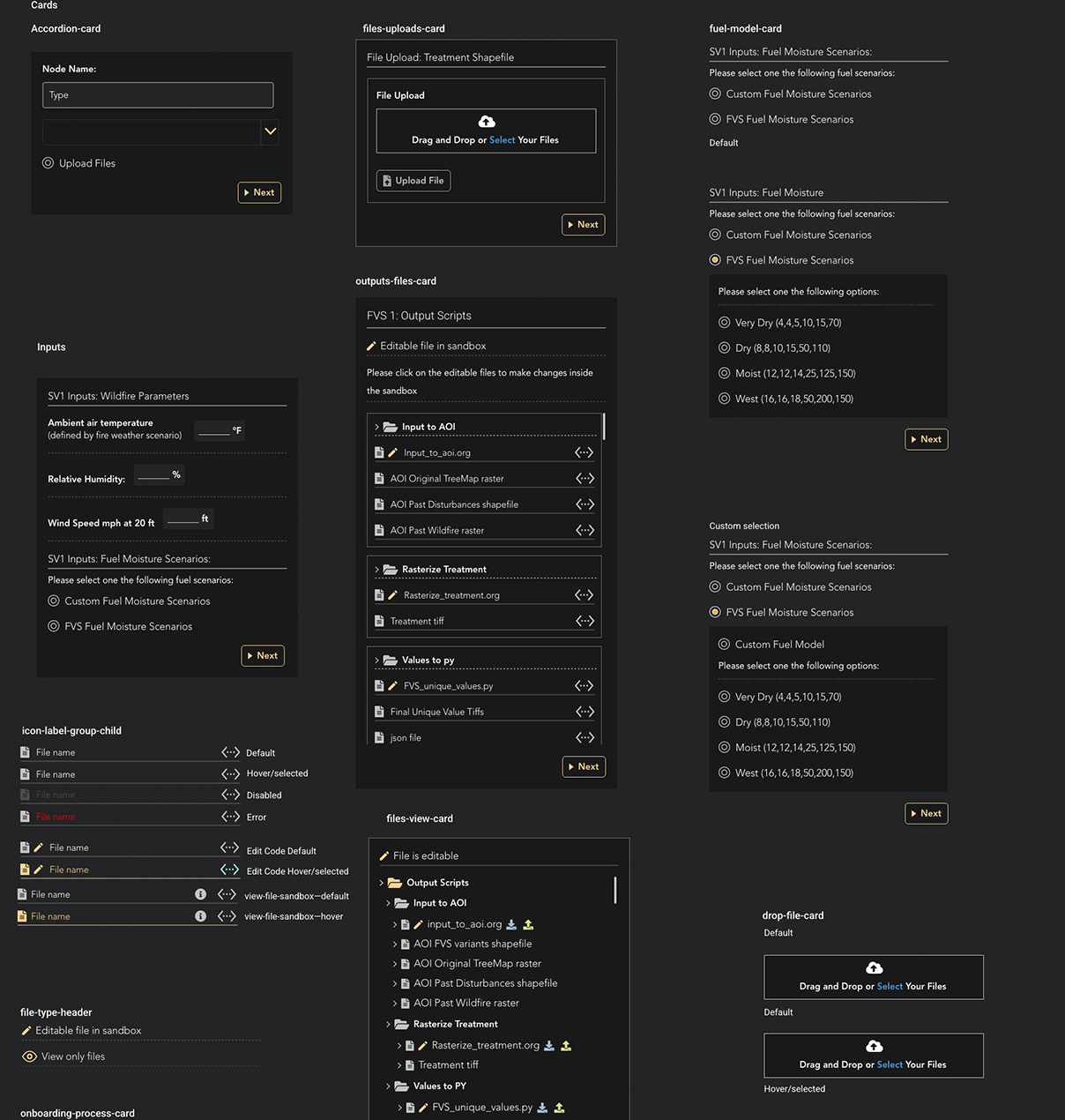
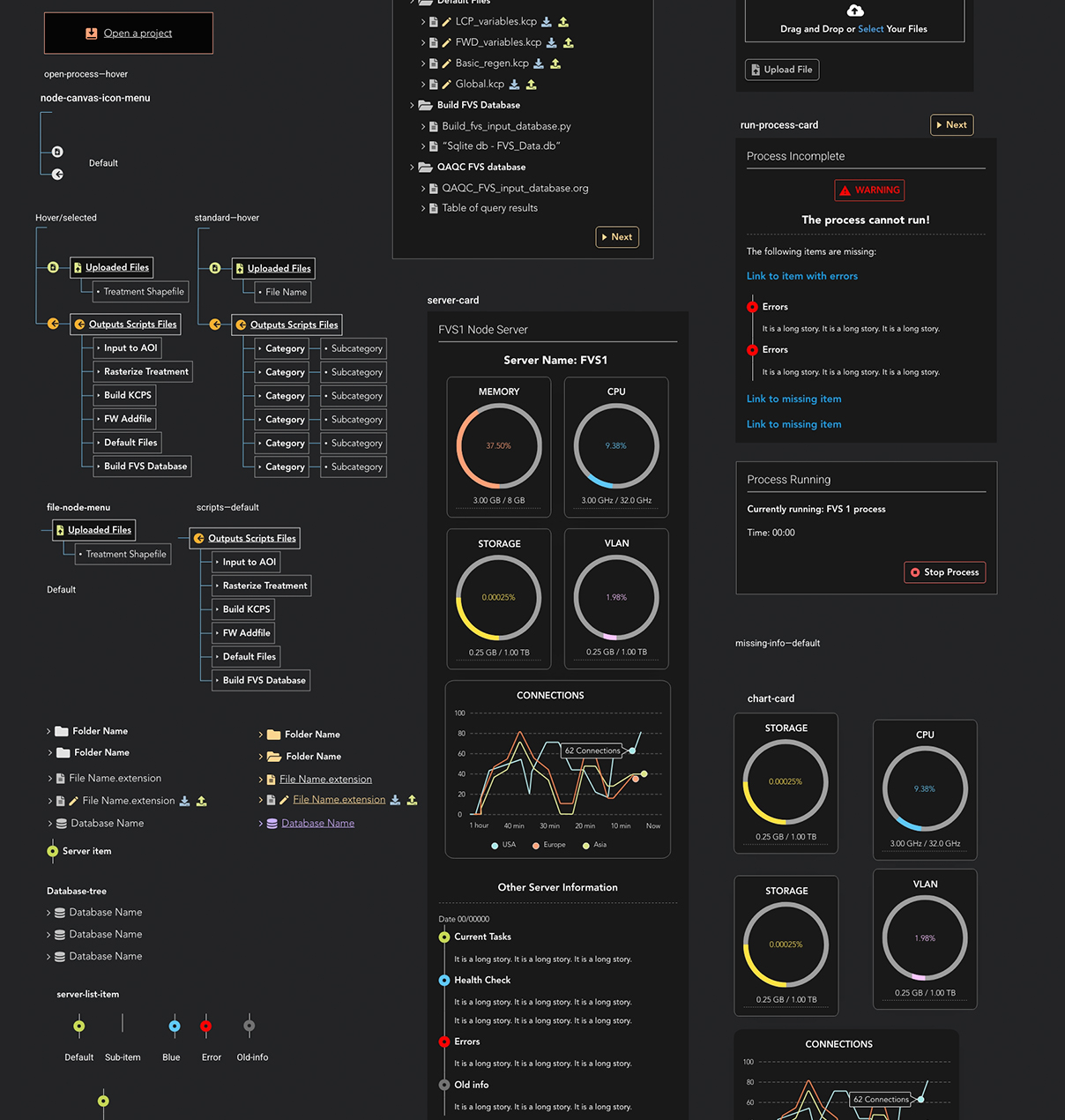
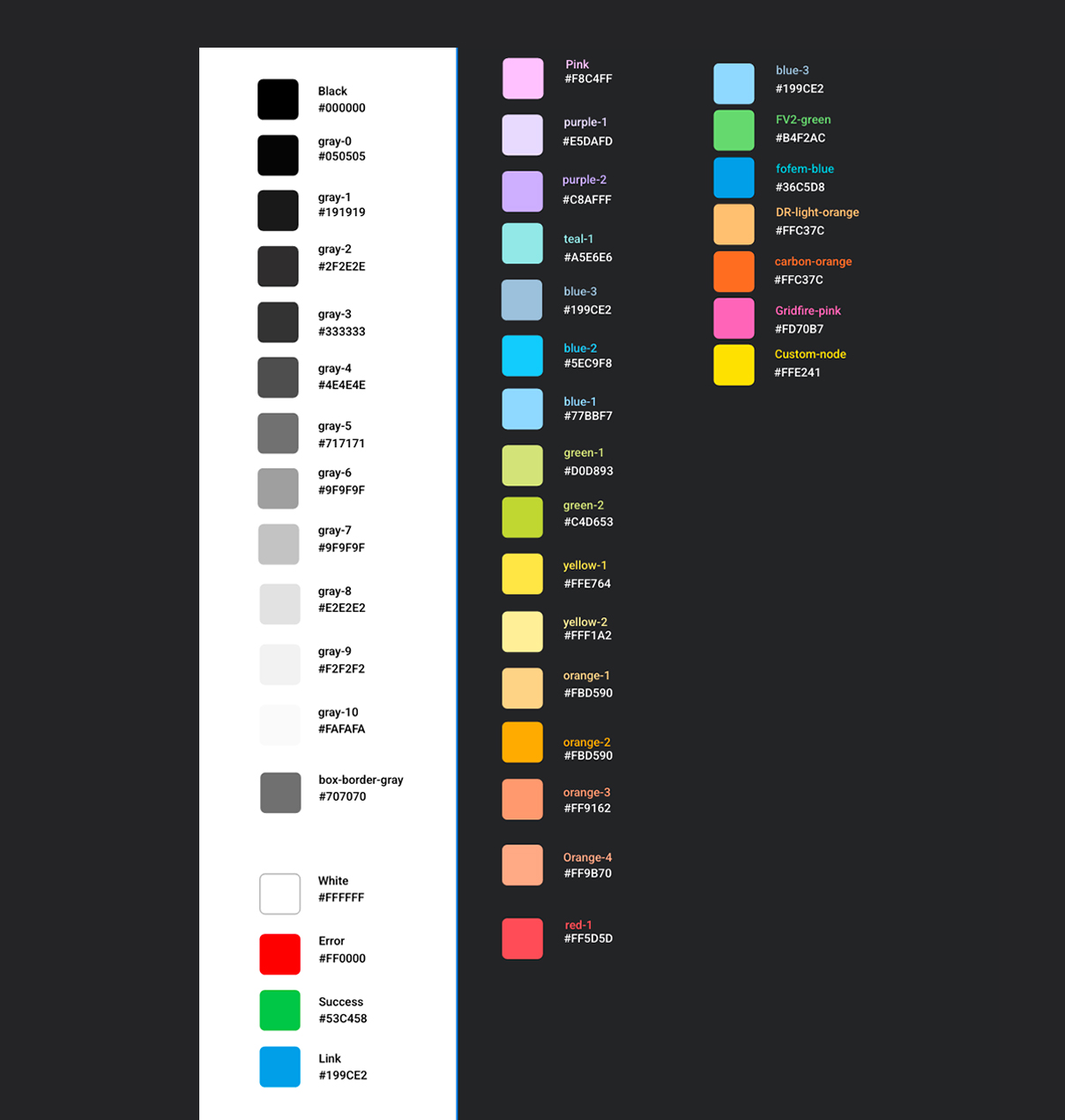
Kraken required a consistent UI language capable of supporting scientific inputs, files, scripts, processes, errors, system status, and custom workflow components. I created a reusable design system so new scientific tools could be added without redesigning the interface for every workflow.

COMPONENT SYSTEM

Build and connect modeling processes visually.

SYSTEM STATES & MONITORING

The component system also covers node relationships, file structures, server health, process execution, warnings, errors, and running states, keeping technical feedback consistent across the application.

COLOR SYSTEM

A dark neutral foundation supports dense scientific information, while semantic colors distinguish errors, success, links, workflow states, and model-specific nodes so users can recognize system meaning quickly.

TYPOGRAPHY SYSTEM

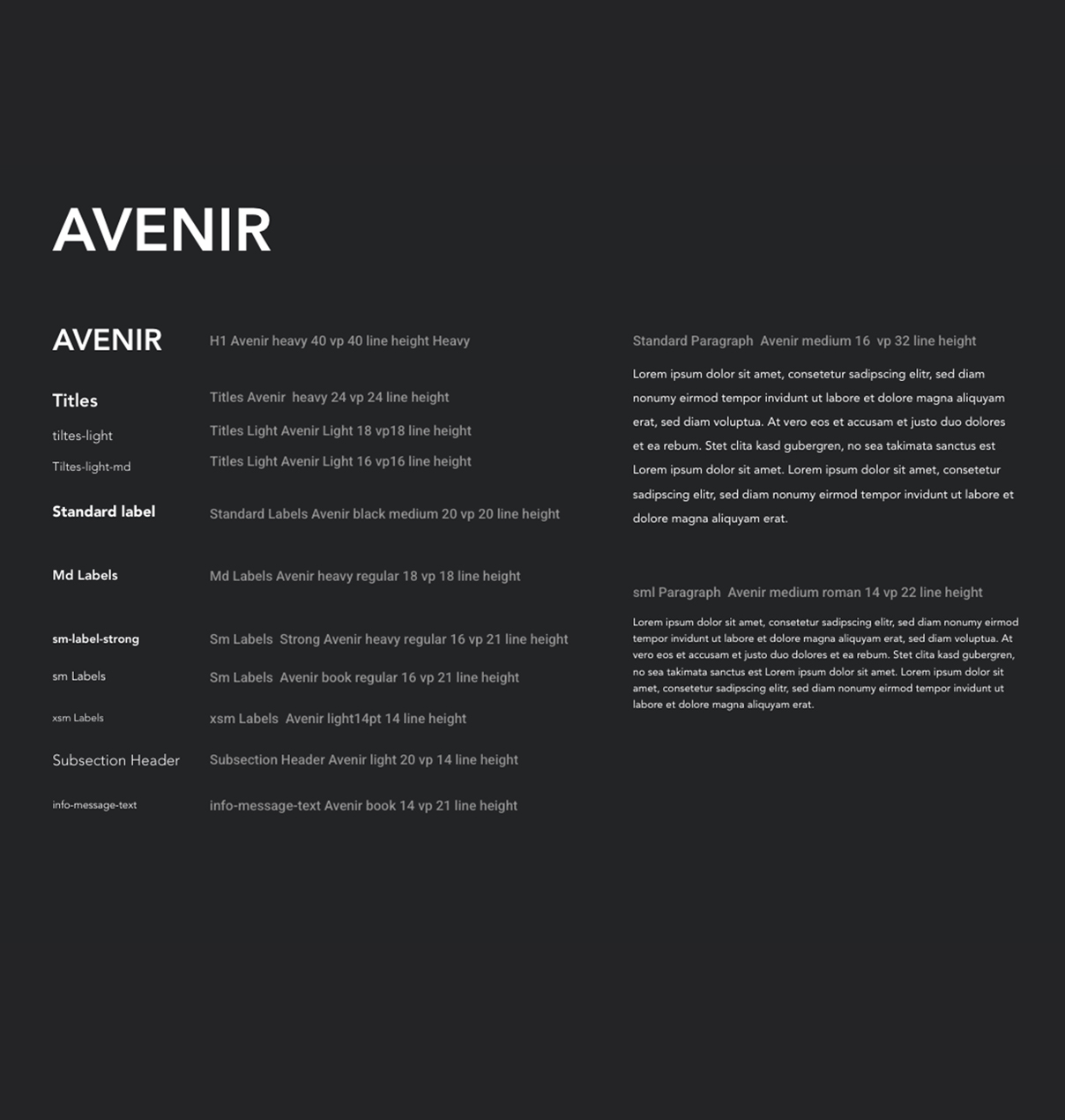
A defined Avenir hierarchy organizes titles, labels, instructions, metadata, and technical content so information remains readable even in dense working environments.

Implementation

Translating scientific workflows into a configurable interface

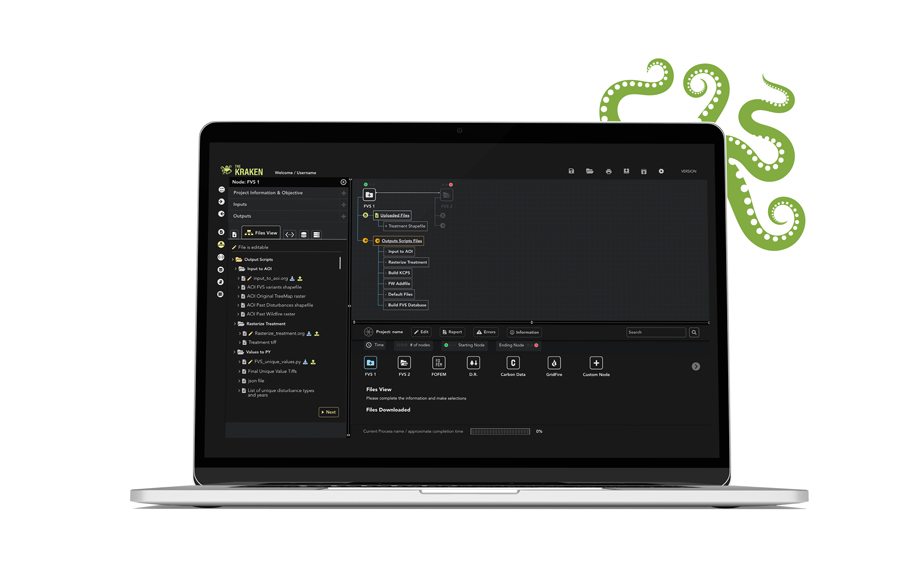
Kraken’s implementation brought together the workflow canvas, node configuration, scripts, files, databases, server information, process states, and reusable UI components inside one persistent workspace. The system was designed so scientists could assemble workflows visually while still working directly with code and data when needed. 

The Kraken, a scientific workflow platform

Outcomes

Reducing fragmentation in scientific modeling workflows

Kraken was designed to centralize processes that had previously been distributed across separate tools and systems. By connecting scripts, datasets, servers, models, and workflow execution in one environment, the platform reduces manual switching and makes complex processes easier to inspect, modify, and manage.

It also gives scientists more direct control over the process: they can run individual nodes or complete workflows, monitor progress and errors, inspect outputs, edit code, and configure QA/QC according to the needs of a specific scientific model.

Resizable workspace

Scientists can expand and redistribute working areas based on the task, giving more room to code, files, process information, or the workflow canvas when needed.

Script comparison

A dual-view scripting workspace allows users to inspect and compare files side by side, supporting validation, debugging, and code review without leaving the application.

Project The Kraken

Overview

The Kraken, a scientific workflow platform

role

Product Designer | UX/UI | Information Architecture | Interaction Design

FOCUS

I translated complex scientific workflows into a configurable workspace where users can build, inspect, run, and compare processes through adjustable grids, flexible panels, connected nodes, and side-by-side scripting.

context

A flexible workspace for complex scientific workflows.

Kraken brings computational tools, scripts, services, data, and connected processes into one visual environment. It supports both structured node-based workflows and direct work with scripts, servers, and individual services.

Challenge

Create one coherent workspace for multiple technical workflows: node-based processes, scripts, servers, and services, all without forcing users into a single interaction model or losing visibility as complexity increases.

The Kraken logo

Users

Wildfire scientists and scientific modelers.

Kraken was designed primarily for wildfire scientists who needed to combine external databases, modeling tools, scripts, and computational services within one controlled in-house workflow. The goal was to reduce fragmentation while preserving the flexibility and technical depth required for scientific work.

Wildfire Scientists & Modelers

Integrate data, models, and computational workflows

Fire Analysts

Build and run modeling workflows

Researchers & Model Developers

Create, test, and validate models

Technical / Data Specialists

Users working with scripts, databases, APIs, servers, and computational resources

RESEARCH

Kraken originated from scientists and modelers who needed a centralized workspace for combining scripts, datasets, servers, models, and automated processes that had traditionally lived across separate systems.
Their requirements shaped the product from the beginning: visual workflow creation, editable code, custom nodes, file and database access, server monitoring, execution controls, error visibility, and workflow-specific QA/QC.

The design challenge was not to simplify scientific capability, but to bring complex tools into one environment without taking control away from expert users.

Insights: Real Users' needs

The scientists’ wish list shaped the product. Kraken was ideated by the scientists who would use it. Their existing workflows were fragmented across multiple platforms, scripts, data sources, and computational tools. The requirements below came directly from the people doing the work and became the foundation for the product architecture and interaction design.

1

ONE CENTRALIZED WORKSPACE

Run models, scripts, datasets, and microservices from one environment instead of moving between disconnected tools.
2

VISUAL WORKFLOW BUILDING

Create, view, and modify scientific workflows through a drag-and-drop node interface.
3

DIRECT ACCESS TO CODE & DATA

Edit scripts, code, file directories, database structures, and model inputs without leaving the workspace.
4

FLEXIBLE & EXTENSIBLE TOOLS

Adapt available nodes to the project objective, add custom nodes, and extend workflows as science and data evolve.
5

PROCESS VISIBILITY & CONTROL

Run individual nodes or complete workflows, see errors, monitor processing status, stop processes, and understand compute progress.
6

BUILT-IN QA/QC & MONITORING

Inspect outputs and server status, control start/stop points by node, and configure QA/QC automation for the needs of each scientific workflow.

The Kraken, one workspace for many scientific processes

Architecture

Designing one workspace for many scientific processes.

Early architecture focused on organizing the platform around the scientists’ actual workflow rather than around separate tools. I mapped a persistent workspace where users could build processes visually, access files and code, configure inputs and outputs, monitor execution, and inspect results without leaving the environment.
The interface was divided into flexible working zones that could expand, collapse, or resize according to the task, allowing the same system to support visual modeling, scripting, file management, server interaction, and process monitoring.

WORKFLOW CANVAS

Build and connect modeling processes visually.

FLEXIBLE WORKSPACE

Resizable regions adapt to code, files, process details, or visual workflows.

PERSISTENT SYSTEM VISIBILITY

Inputs, outputs, status, errors, tools, and process information remain accessible throughout the workflow.
Kraken Modular scientific sandbox prototype

Design System

Turning complex workflows into reusable interface patterns

Kraken required a consistent UI language capable of supporting scientific inputs, files, scripts, processes, errors, system status, and custom workflow components. I created a reusable design system so new scientific tools could be added without redesigning the interface for every workflow.

COMPONENT SYSTEM

Build and connect modeling processes visually.

SYSTEM STATES & MONITORING

The component system also covers node relationships, file structures, server health, process execution, warnings, errors, and running states, keeping technical feedback consistent across the application.

COLOR SYSTEM

A dark neutral foundation supports dense scientific information, while semantic colors distinguish errors, success, links, workflow states, and model-specific nodes so users can recognize system meaning quickly.

TYPOGRAPHY SYSTEM

A defined Avenir hierarchy organizes titles, labels, instructions, metadata, and technical content so information remains readable even in dense working environments.
The Kraken, a scientific workflow platform

Implementation

Translating scientific workflows into a configurable interface.

Kraken’s implementation brought together the workflow canvas, node configuration, scripts, files, databases, server information, process states, and reusable UI components inside one persistent workspace. The system was designed so scientists could assemble workflows visually while still working directly with code and data when needed.

Outcomes

Reducing fragmentation in scientific modeling workflows.

Kraken was designed to centralize processes that had previously been distributed across separate tools and systems. By connecting scripts, datasets, servers, models, and workflow execution in one environment, the platform reduces manual switching and makes complex processes easier to inspect, modify, and manage.

It also gives scientists more direct control over the process: they can run individual nodes or complete workflows, monitor progress and errors, inspect outputs, edit code, and configure QA/QC according to the needs of a specific scientific model.
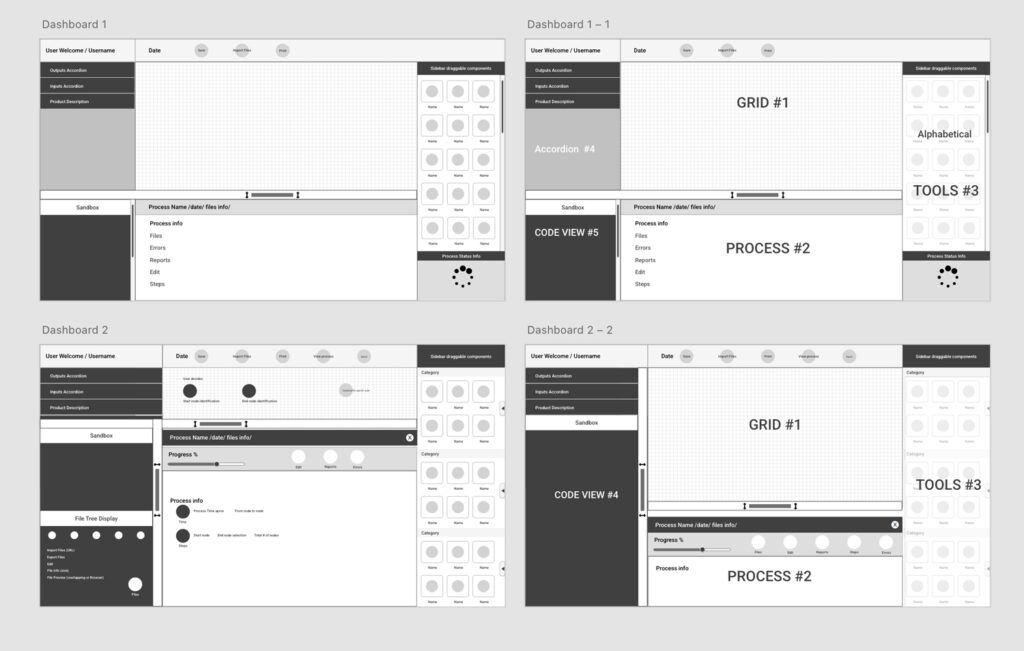
Resizable workspace

Scientists can expand and redistribute working areas based on the task, giving more room to code, files, process information, or the workflow canvas when needed.

Script comparison

A dual-view scripting workspace allows users to inspect and compare files side by side, supporting validation, debugging, and code review without leaving the application.